
Yes this is possible and it is actually quite easy. You just need to follow the steps below.
As MS Outlook no longer supports CalDavs directly no more, you will need to install a add on called Outlook CalDav Synchronizer which can be found at the following link (https://caldavsynchronizer.org/)
Once this is done you will need to open Outlook and sign-in if not already.

Go to the CalDav Synchronizer and click Synchronization Profiles.
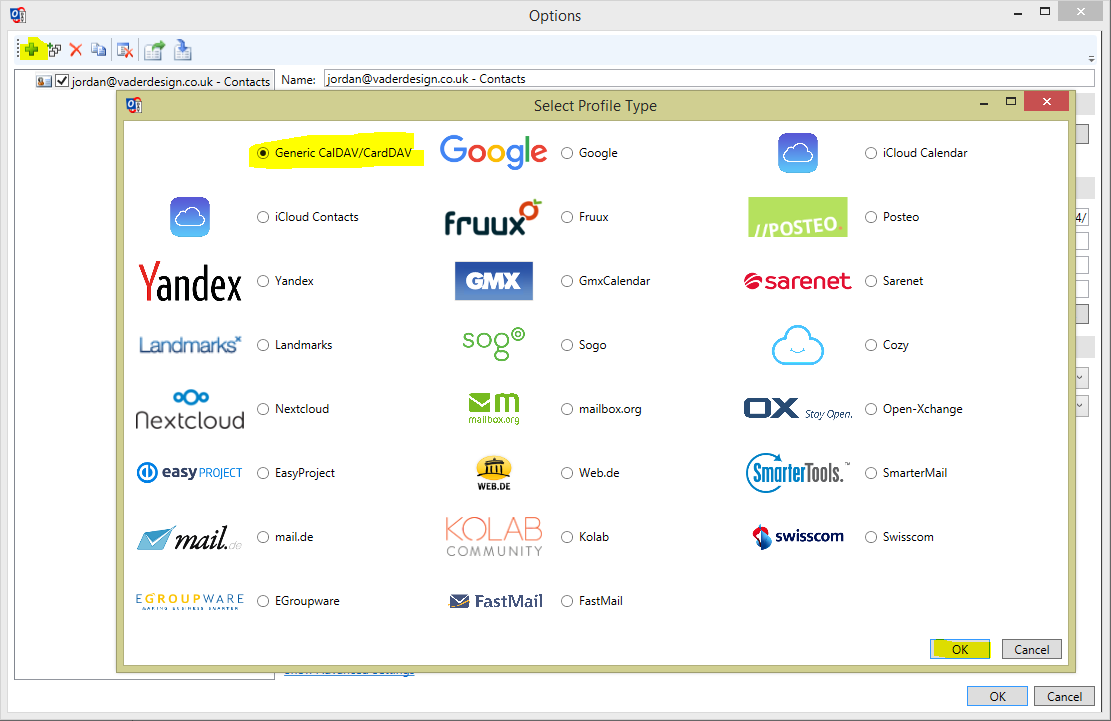
Click the Green Plus Button and then select Generic CalDAV/CardDAV then click OK.
Next in Outlook Settings, set your folder to Contacts, this is where your contacts will be saved. For peace of mind I recommend Ticking Synchronize Items immediately after change.
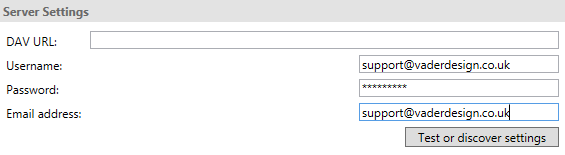
Then in Server Settings fill in your Details. If you are using cPanel your username will be your email address. Press Test or discover settings, and it should fill in your DAV URL. If not please follow the instructions on how to find your DAV / Email Details (YouTube).
